
Many of you have been asking for this feature for a long time. We are delighted to announce that the Wishlist is finally here.
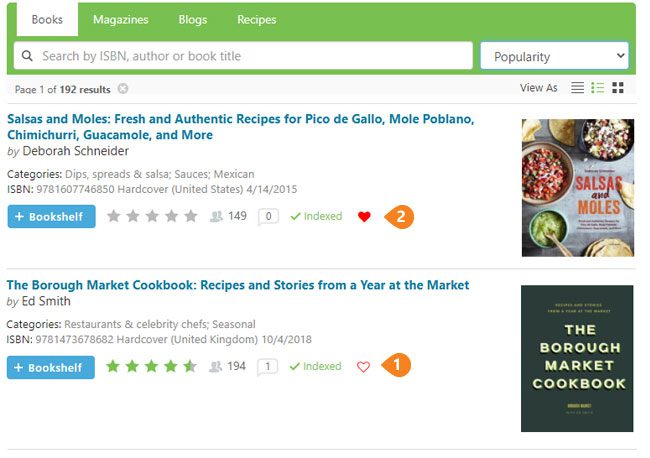
- Next to each book and magazine's indexing status in the EYB Library you will see a red heart outline.
- When you click it, the heart turns to a solid red - the book or magazine is now on your Wishlist.
- To remove an item from your Wishlist you just click on the solid red heart and it changes back to an outline. None of the recipes from books in your Wishlist will appear in your searches.
To view and use your Wishlist:
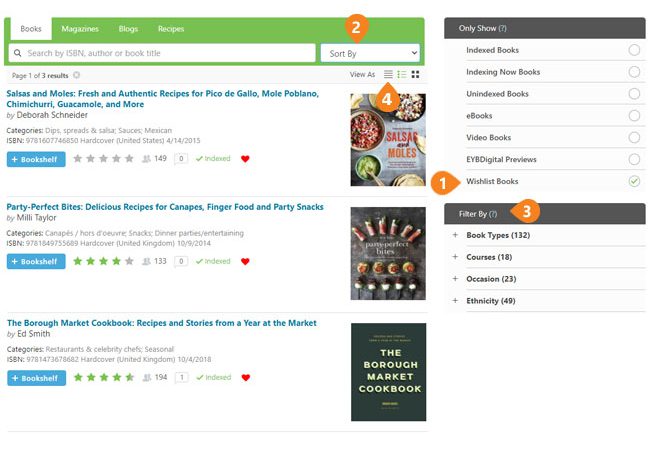
- Select Wishlist from the filters on the right (or under the Filter link on a phone) in the EYB Library (not My Bookshelf).
- Sort your Wishlist using Sort by
- Use filters to find - types of books, courses, ethnicity, etc.
- Print your list using the Print command on the minimized view (the left option in View As under the green search bar).
Now when you are in a used bookstore looking for treasures, you can sort your Wishlist by author or title to quickly find a match. Or when someone asks you for a gift suggestion and you can't remember the title of that Italian desserts book you have been craving - now you can find it in seconds.
Update Oct 20, 2021 - you can now share your wishlist with friends and family. Click the URL after you have selected the Wishlist filter in Library Books. Then email or text to whoever you want. They do not have to be an EYB member to open the link.
22 comments
Jenny
nwaterman967
eliza
averythingcooks
Esylvia
Mrlew1
anightowl
jbny
leilx
Jane
ashallen
Ceribells
Part of what I like about EYB is getting a sneak peak or recipes before I buy a book. I'd like to suggest for the future: maybe we could get an email when a wishlist book is newly indexed, like we do for the bookshelf?
Jane
MaineDruid
Jane
trudys_person
KennethJames
hirsheys
Tweety134
robinorig
mllamas
ceejayen