

We have added a very cool tool to EYB that improves the usability of the site for our members with disabilities. Click the new green symbol at bottom left of your screen and see all the options - specific accessibility profiles like blind, color blind, dyslexia or ADHD can be selected and the site will adjust accordingly. Or you can customize the site features such as font size, spacing, color contrast, etc to suit your own preferences.
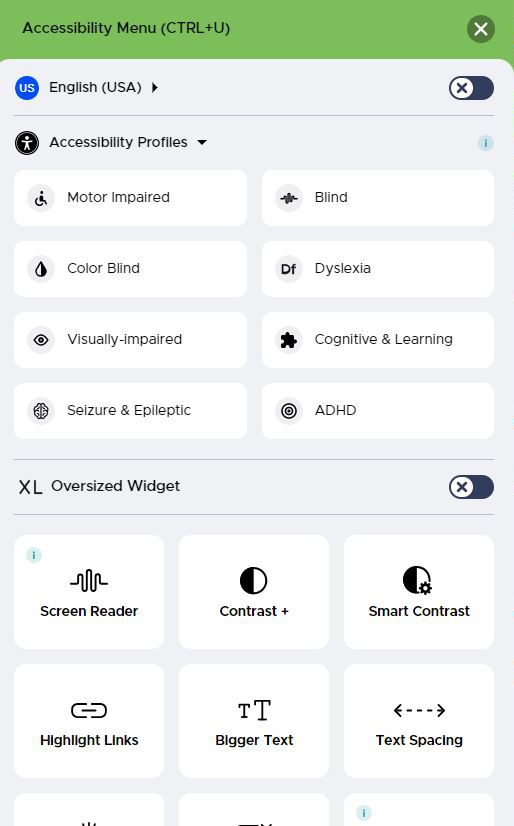
Another exciting feature of this tool, for our members who do not speak English as their first language, is that you can now translate the site to any of the main languages of the globe. Or even if you don't speak another language you may want to view a recipe in say French to learn how the ingredient names translate.
If you don't want to see the icon, there is the option to move or hide it. Scroll to the bottom of the menu and select Hide. You then can select the time period for it to be hidden. If you later decide you want to see it again, type CTRL U and it will reappear.
And another new feature that has gone live today is that Serves is listed at the bottom of the ingredients list (when that data has been stored).
We would love to hear members experiences using the new accessibility tool.
17 comments
racheljmorgan
darcie_b
eliza
Jane
redbird
Now I wonder how to get the widget back if I do indeed need these features in the future!
Thanks, Jane, for this enhancement. I am sure that it will be a great help for many.
eliza
pitterpat4
Jane
Pirateemma
chawkins
demomcook
demomcook
Rinshin
Great features. Thank you.
Jane
Jane
Mrlew1
Zephyrness